
Australia is blessed with many point of sale (POS) systems, but few straightforward and affordable ones for a small restaurant or café. We’ve tested a wide range of hospitality POS and compared costs and which types of business each is best for.
One thing we look for is ease of use. Easy POS is one you can set up quickly and has all the hospitality features needed at the register. Even more convenient is a setup already linked to a payment system.
Another essential is the hardware package, which traditionally is expensive, but can be bought at great discounts from some POS providers. This means committing to their software and sometimes payment system too. Contract lock-in is indeed something many, but not all, POS providers like to sneak in.
Let’s compare the best POS systems for restaurants and cafés we recommend specifically for Australia.
| Hospitality POS |
Pricing | Best for | Editor’s view |
|---|---|---|---|
 |
|
All-round value for cafés, restaurants and quick-service. Can service retail area too | “This is a complete POS package that can cater to retail too” |
 |
|
Quick-service, cafés with a busy kitchen, flexible setups | “Square doesn’t clutter the POS with too many buttons – it’s just very efficient” |
 |
|
Uncomplicated, small cafés, food stalls and pop-up bars | “Cheaper than Square, but only for uber simple setups” |
 |
|
Hotels and full-service restaurant with strong reporting needs | “All the features you need in an iPad POS, with good help from support” |
 |
|
Cafés, food trucks and multi-outlet venues needing flexibility | “An easy tablet POS to grow with, and many will like it’s an Australian company” |
 |
|
Larger, multi-venue restaurants | “This is a premium, tailored POS that costs quite a lot, but it’s high quality” |
*Excludes GST
Epos Now – complete packages with low card processing rate
Key details
- Purchase register kit for $649+ total + software from $49/mo
- Annual plan with hardware bundle from $60.50 incl. GST/mo + $78/mo for service
- Runs on iPad, Android and Windows
- Card payments integrated with low rate
- Ideal for any size restaurant
What we like
What we dislike
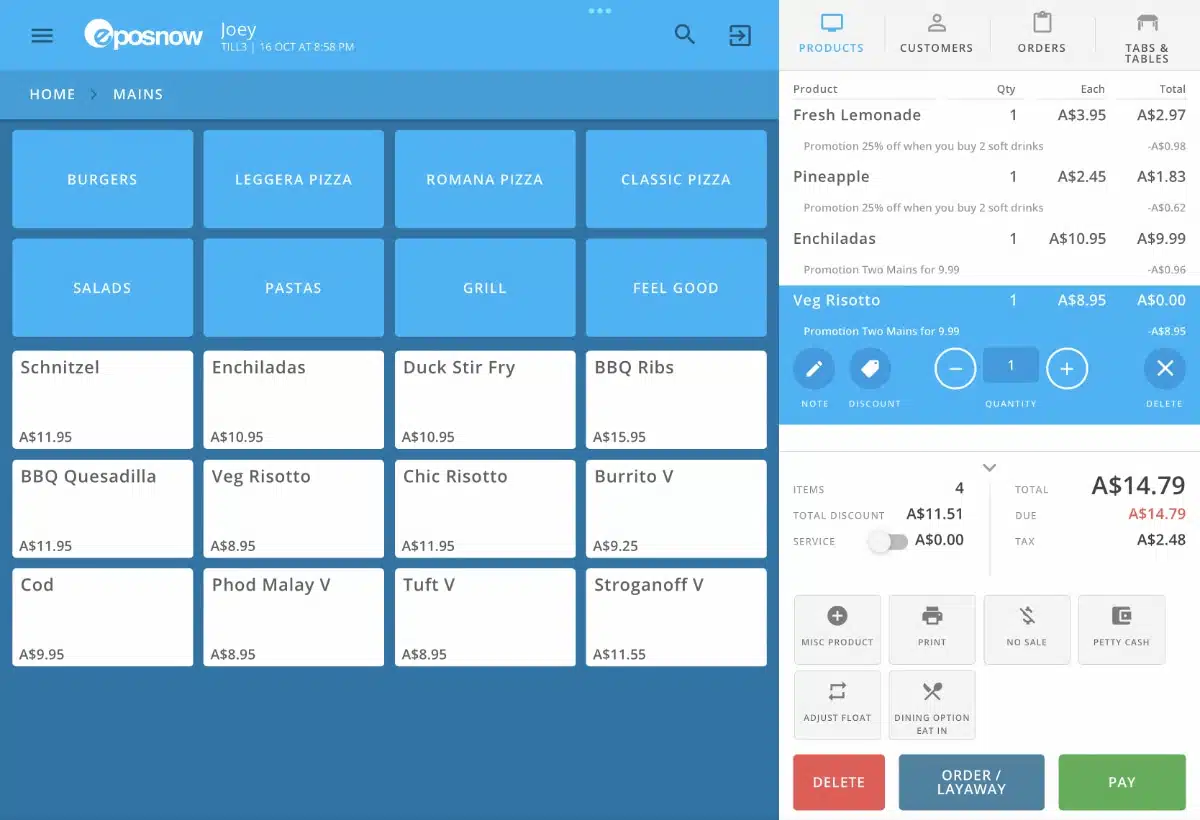
Epos Now is a scalable system that works on most devices – iPad, Windows and Android tablets. Based on my tests, I think it’s suitable for small businesses and large restaurant chains alike.
The Epos Now software is fundamentally the same for hospitality and retail, with customisations specifically for food and drink included. The company also sells hardware bundles with touchscreen monitors, receipt printers, cash drawers and more starting from $649 including an EFTPOS machine – pretty cheap, in my experience.
It has its own payment system (Epos Now Payments) with a personalised transaction rate for Visa and Mastercard typically falling between 1% and 1.1% for domestic cards.
Image: Mobile Transaction
Epos Now keeps most of their pricing hidden, but we know there are different options. You can pay upfront for hardware and software with no ongoing software fee, pay upfront for hardware and then subscribe to software, or pay for the software only for $49 monthly.
There are also different subscription tiers for the EPOS app: Standard, Premium and Enterprise. In all of them, you can add unlimited products, users and customers, and software and security updates are included.
The Standard and Premium plans both have cloud reporting, while the Enterprise plan has more advanced reporting.
Epos Now offers 24/7 customer support, but only at an extra cost. You just get email support and initial help to set up on the basic plan, leaving you to your own devices. An enterprise plan provides onsite support.
We think it’s a stretch to charge extra for customer support – a deal-breaker for certain cash-strapped merchants. Most other POS systems include phone support at any price level.
Epos Now Hospitality pricing
Software-only plans from $49/mo
Purchase hardware from $649 upfront
Hardware + software bundle for $60.50/mo + $78/mo for customer service
* GST included in prices.
“Epos Now doesn’t have the most appealing app interface – the text is small and the blue colour scheme is not for everyone. I still think it’s a good POS system with useful integrations like card payments and affordable hardware.”
– Emily Sorensen, Senior Editor, Mobile Transaction
While there have been reports of limited features, technical issues getting started and usability challenges, Epos Now offers many essential functions for restaurants and the option to integrate with popular apps for accounting, marketing and customer loyalty.
You can also rent touchscreen PC terminals in equipment bundles if you can’t afford to purchase them upfront.
How do I learn more?
On the website, you can request a callback for more information.
Square for Restaurants – extensive integrated platform with free extras
Key details
- Software from $0
- Runs on iPad and Square hardware (kits from $1099)
- Card payments integrated for 1.6% per tap and chip transaction
- Suits small, fast-paced restaurants
What we like
What we dislike
Square for Restaurants is a POS system for fast-paced cafés, small restaurants and quick-services.
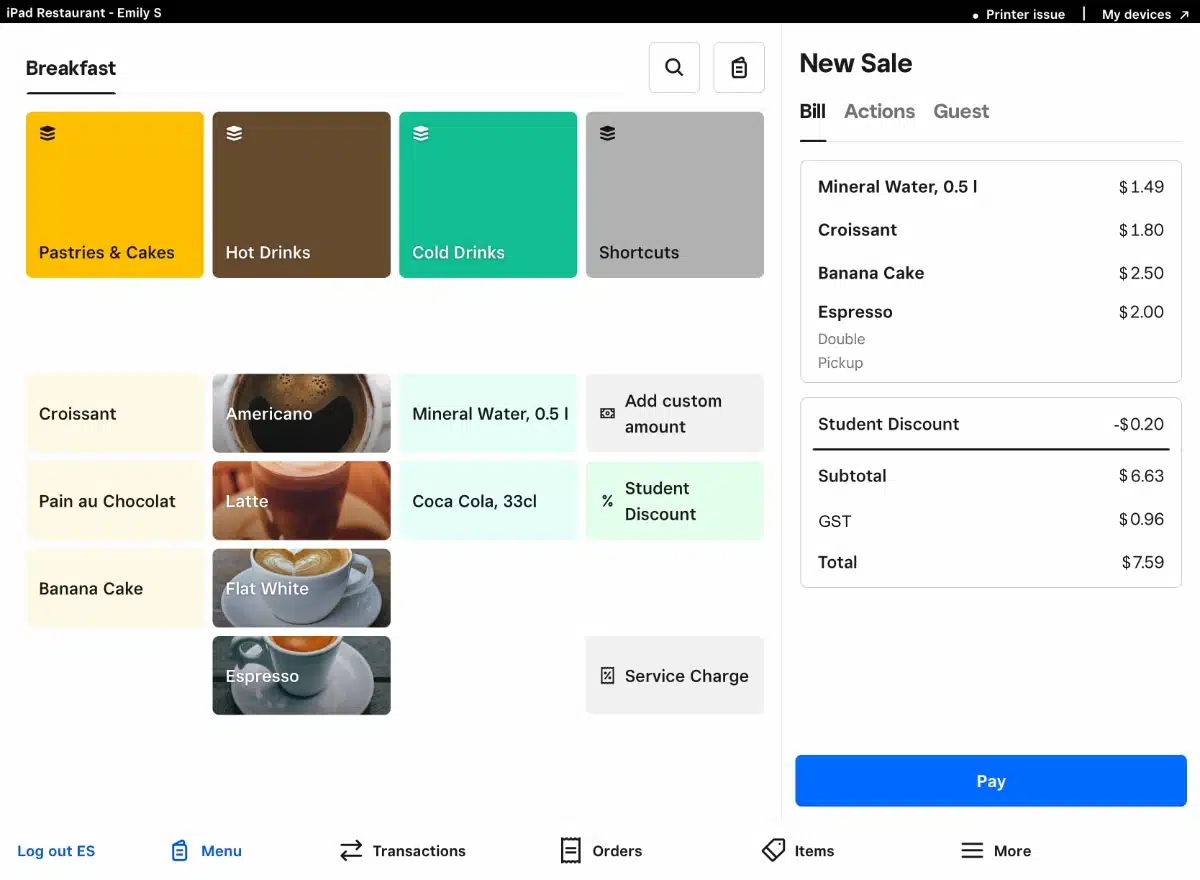
It’s my personal favourite for its robust app that’s frequently updated and improved, but I didn’t like how it forced me to customise a ton of workflows when I first wanted to test it. Still, that’s a good sign it works around your business rather than dictating how you should process orders.
The software works on iPad and Square’s POS and payment terminals, but you get many extra online payment tools integrated with the front-facing POS system.
Image: Mobile Transaction
To sign up, you only need to complete a short online form and connect a bank account. You can then start using the Restaurants Free plan for essential hospitality features or Plus for all the restaurant features.
The software is simple, but sufficient, for a small restaurant where checkouts need to coordinate kitchen orders and table service. It has great syncing between front- and back-of-house.
The Free plan lacks some important features like close-of-day reports, seat and course management, advanced employee management and a Kitchen Display System (KDS). These are all included on the Plus for $129 incl. GST monthly for unlimited registers at one location.
Square for Restaurants pricing
Software: Free (basic) or $129/mo per location
Fixed EFTPOS rate: 1.6% (all cards)
Hardware kits: Square Register for $1099 or other hardware bundles with iPad from $1548
Note: Prices include GST.
The iPad app works with Square Reader or you can use the POS software on Square Register ($1099 incl. GST) with a touchscreen and attached card terminal. The standalone Square Terminal or Handheld work well for table service payments. All card transactions cost 1.6% regardless of the type of card.
“Square is excellent for fast access to funds with its instant payout option. And it’s one of the fastest and most clutter-free POS systems we’ve tried, but you first have to spend some time setting up all the workflows and inventory.”
– Emily Sorensen, Senior Editor, Mobile Transaction
Apart from POS features, you can set up click and collect, integrate with takeaway platforms and accept bookings over the phone. Alternatively, you can use eGift Cards, payment links and QR codes for touch-free ordering.
Overall, Square offers excellent value for money, but we recommend trialling the software in case it lacks something you need.
The Free plan only includes customer support on business days between 9 am and 5 pm, but Plus has 24/7 support to suit social hours.
How do I learn more?
Sign up on Square’s website to start a 30-day free trial of Plus, or just use the Free plan indefinitely.
Zeller – still basic, but affordable for simple food operations
Key details
- Free POS software
- Runs on iPad, Android and Zeller Terminals (basic Android kit from $450)
- Card payments integrated for 1.4% per transaction
- Suits small cafés and food stalls
What we like
What we dislike
Best known for its EFTPOS machines costing only $99 to buy, Zeller has also launched its own POS system, rivalling Square. It’s free by default, but doesn’t have any paid upgrade options with more features.
Having tested the software, I’d say it’s quite basic at this point, but with core features needed in hospitality. This includes a product menu where you can add food and drink items, modifiers, tax rates and variants. You can send orders to a kitchen printer producing a docket and set up user accounts with different permissions.
Image: Mobile Transaction
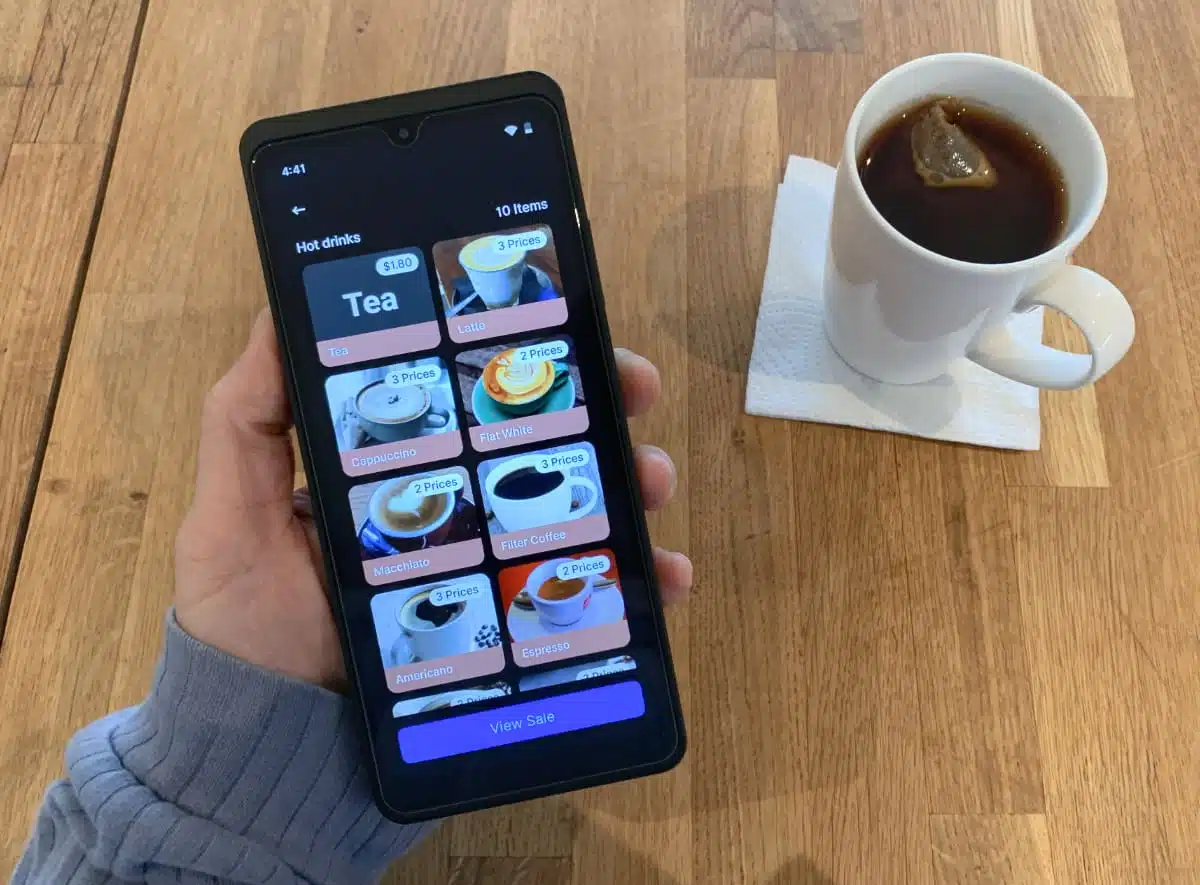
However, the POS system is still being developed. Several features advertised by Zeller are still “coming soon”, so not live. This includes a kitchen display system, assigning customers to a table plan and starting a tab – all essential for most restaurants.
Rather, Zeller POS is a light setup for business owners that love a minimalist, aesthetically pleasing register manned only by a small team of staff. Since there’s still no digital kitchen display system, only a way to send orders to a kitchen printer, I’d just recommend this POS to small spaces where staff can hear each other for verbal instructions.
A big advantage of Zeller is its attractive fixed rate of 1.4% per chip or tap payment without a contract or monthly fee. This is truly good value, particularly when you decide the hardware budget.
Zeller POS pricing
POS software: Free
Hardware: $99 for EFTPOS machine + any Android tablet or iPad, receipt printer and cash drawer
Note: Prices include GST.
A lighter version of the POS software works on both Zeller Terminal 1 and 2, whereas you can download the full app on Android tablets and iPad. The only requirement is that you buy at least one Zeller Terminal and sign up as a user (free) which includes a business account and debit card for fast access to payouts.
With these minimal hardware requirements, you have the freedom to just use a Zeller Terminal as a portable micro-register or an existing tablet and stand as your counter register. Card payments all go through Zeller, but you can accept cash with a cash drawer and print receipts through compatible printers.
Despite the easy do-it-yourself setup, there’s still 24/7 customer support to help with any issues or questions.
How do I learn more?
Sign up on the website free or contact Zeller for a custom setup.
Lightspeed Restaurant – all-in-one POS for most food businesses
Key details
- Software with table management from $120 + GST/month
- Annual and monthly plans
- Runs on iPad only (complete kits from $1620)
- Card payments integrated with custom rates
- Suits small to multi-location restaurants
What we like
What we dislike
Lightspeed POS has been through several iterations, but we approve of the latest version for hospitality we tested: Lightspeed Restaurant (K-series).
It’s an iPad point of sale accommodating for full-service restaurants and bigger establishments. Yet even for me as a single user, the system felt user-friendly once I got the hang of it.
“Inventory features are enough for many small table-service restaurants. But I’d say probably the biggest strength of Lightspeed Restaurant is how the team helps to set the system up, so even those with no experience can get an easy start.”
– Emily Sorensen, Senior Editor, Mobile Transaction
Image: Mobile Transaction
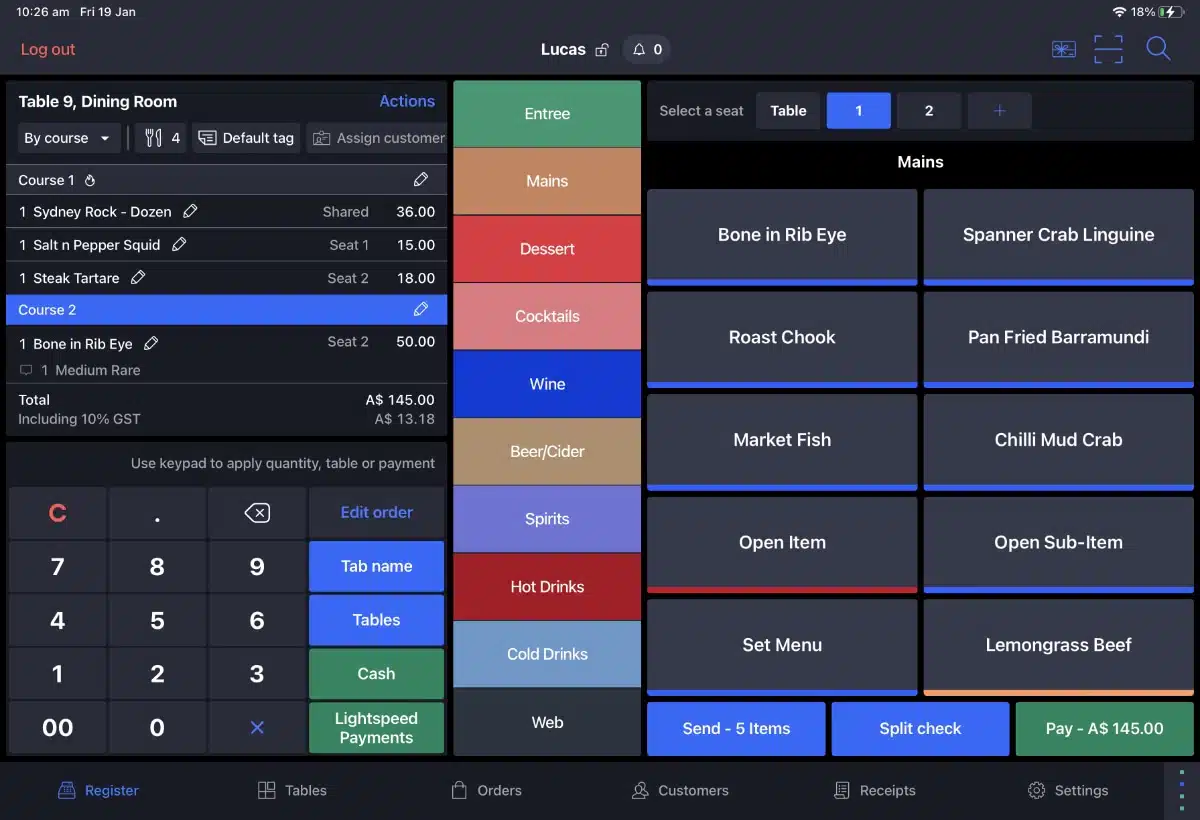
The software works with a WiFi connection, but the offline mode enables you to carry on operations during internet outages.
Lightspeed gives all new users a free video onboarding session where you can have any questions answered. Their customer support lines are open 24/7, excluding holiday periods. Emailing and web chatting are also possible, and there’s a help section online.
The cheapest plan, Basic, is great for cafés, bars and quick-service. It actually has many features like bar mode, takeaway and restaurant workflows, and integrated payments.
Still, we recommend Plus or Growth or for quick- and full-service restaurants in need of table management and staff management tools. You’ll need Growth for setting up promotions, timed courses, guest analyses and coordinated order printing.
Chains and hotels with more advanced revenue insights or the need to integrate with property management software should opt for Pro.
Lightspeed Restaurant plans
Basic: $40/mo (1 register)
Plus: $120/mo (1 register)
Growth: $220/mo (2 registers)
Pro: $340/mo (5 registers)
Per extra register: $40/mo
Complete hardware kits from $1620 upfront. Free EFTPOS integration for fixed custom fee.
Note: Prices exclude GST.
The POS system has basic inventory features (such as purchase orders via email and wastage tracking), but advanced inventory functions require the higher plans. Different add-ons are available, like an order display system and advanced marketing tools.
Lightspeed has its very own card payment system, but you must first get the EFTPOS machines from Lightspeed. Transactions are charged as a fixed lump sum per month, but there’s no monthly fee for terminal hire.
No other EFTPOS integrates with Lightspeed any more (Tyro used to), which we think is a problem for business owners looking for the best merchant fees.
The software connects with well-known platforms for online ordering, marketing and more, but an accounting integration requires the costly Pro plan. Still, we don’t think you’ll feel stuck if you need a complex setup anyway.
How do I learn more?
Contact Lightspeed for a call, download the POS app on iPad and try the free demo (with limited features).
Abacus – modern, frequently updated app
Key details
- Monthly plans by quote
- Runs on iPad or custom hardware from $1320
- Integrates with Tyro, Smartpay, NAB, Westpac or Stripe for payments
- Best for cafés, foodtrucks or small restaurants
What we like
What we dislike
Abacus is an easy-to-use POS system that used to only work on iPad, but now has an Android version too. The app is very frequently updated, which we know is a good sign.
In 2023, Abacus was acquired by Liven, a hospitality tech company, and the POS system now forms part of this wider software platform rebranded as Nomni. Still, Abacus POS works similarly to before, but may be offered along with other software or hardware.
Photo: Abacus
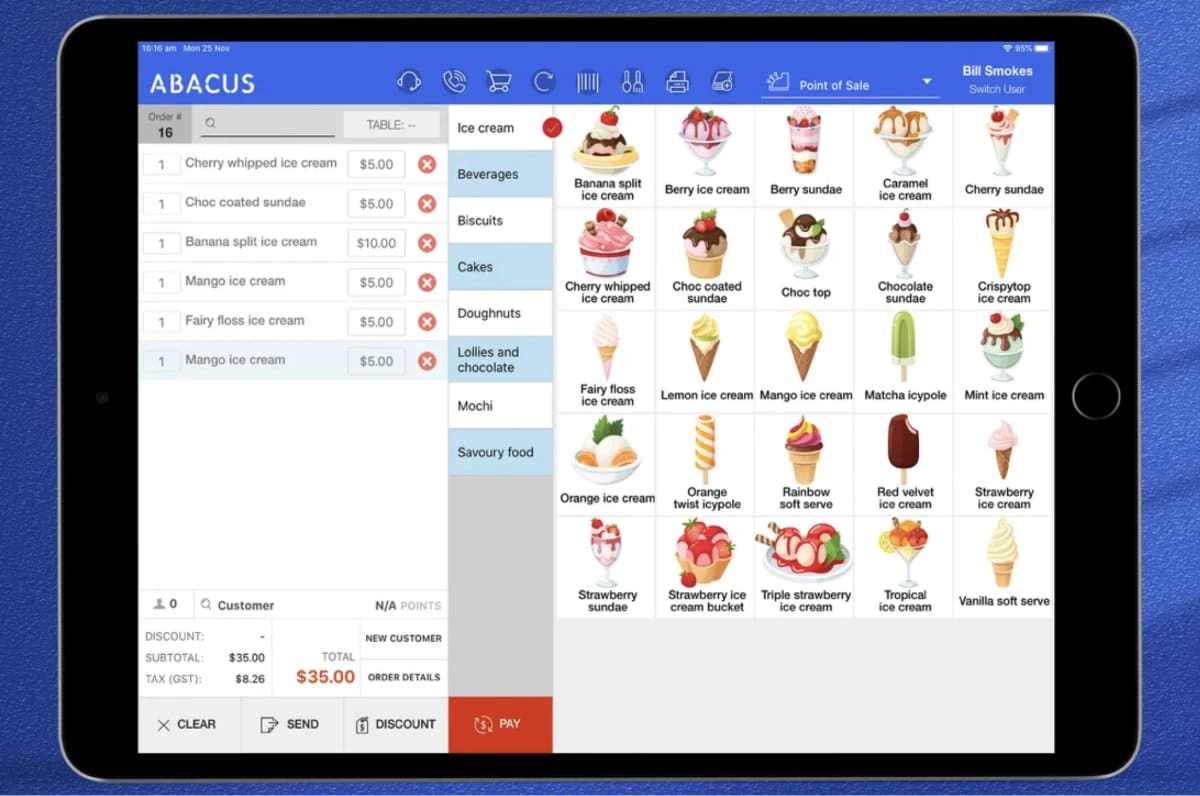
Abacus offers custom packages to suit your physical setup, but its POS app is available in App Store for those who just need a simple, perhaps portable, POS register.
The software is cloud-based and works with an ongoing internet connection or offline.
Abacus used to have a free subscription for trying out the system, but prices now start at $69 monthly.
For more registers, you pay $49 per extra tablet. There are higher plans with more features like accounting integrations and more restaurant features.
The POS app includes essential restaurant features like floor plans, menu, course and staff management. You can add discounts, tips and check your business remotely via an Android or iPhone app.
Abacus POS pricing
1 restaurant register: From $69/mo
Per additional register licence: $49/mo
Advanced plans: Custom pricing
Various POS hardware kits available at different costs
* GST is added to prices.
Advanced functions are available as add-ons for inventory, online ordering, loyalty tools, a kitchen display system, waiter tablets, a self-ordering kiosk, and more.
“Abacus is under rapid development since Liven’s acquisition of the company, and we’ve already seen changes in the product (like the Nomni rebrand). That’s not bad – but make sure you know what you’re buying into when signing up.”
– Emily Sorensen, Senior Editor, Mobile Transaction
You get some decent reporting tools to analyse sales and staff performance, as well as end-of-day reports. The software connects with popular EFTPOS machines from Tyro, Westpac, Stripe and Shift4 (ex-Smartpay), all with different EFTPOS costs.
Customer support is available via live chat or email between 7 am and 11 pm Melbourne time. If you provide a phone number, a team member can call you right away during this time, but there is no helpline to dial directly.
Impos – personalised setup for established venues
Key details
- Custom pricing
- Runs on Windows and iPad
- Payments integrated with custom fees
- Best for large restaurants
What we like
What we dislike
Impos is a premium POS system for medium-to-large food and drink venues, with tailored packages only. It offers everything a restaurant needs to run a professional business, but certain shortfalls mean it doesn’t suit many small businesses.
The main issue is a lack of transparency about features and pricing, which means you’ll likely pay several $100s per month just for the software and a lock-in contract.
Although the website says you can use it with any operating system, there is no iPad or Android app available publicly. If requested, Impos can set up a portable iPad register, but it does not have all the POS features available on a computer.
Photo: Impos
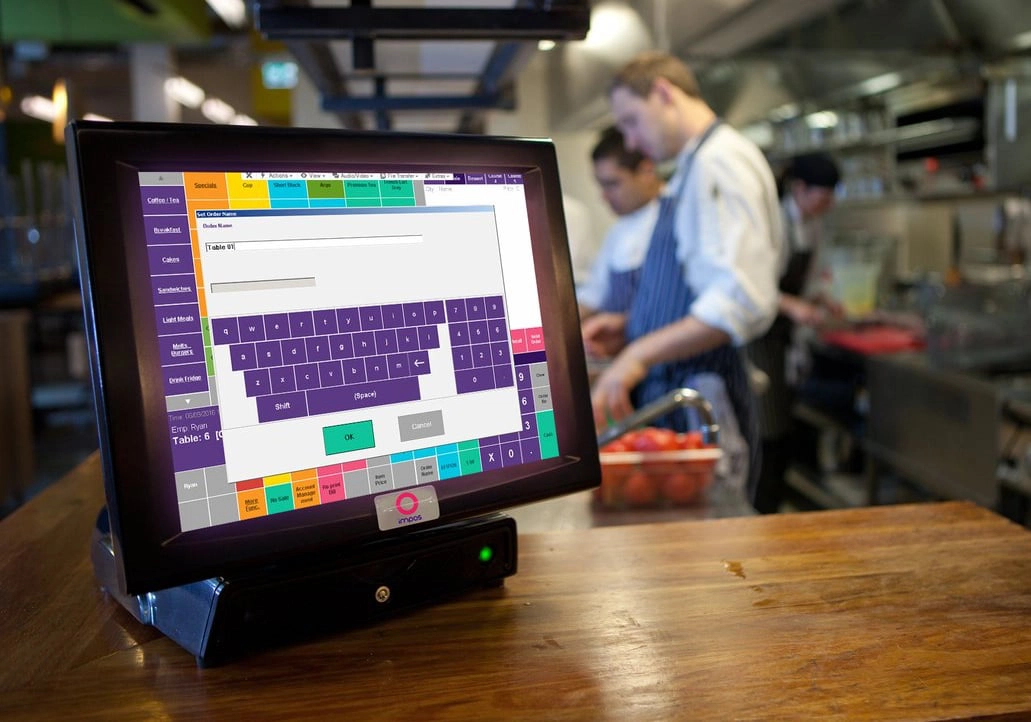
Instead, it is encouraged you buy or rent an industry-grade touchscreen register through Impos. These POS terminals are made to withstand liquid splashes and dirty environments – important for many coffee shops and dining venues.
The POS interface in the register software is colourful and highly customisable. It has in-depth reporting, inventory, rostering, table and staff management functions. Waiters can even log into the software with their fingerprint, if not swiping a staff card on the commercial-grade touchscreen till.
Impos pricing
Custom quote only
The extent of available customer service depends on your support plan, which is separate from the POS subscription. The basic support package includes business-hours support, whereas premium plans include dedicated 24/7 support that cannot be cancelled until after 12 months.
Impos has its own EFTPOS payment system now: ImposPay. Although the company is eager for you to use that, it still connects with Tyro EFTPOS machines as an alternative.
The POS system mainly stores information on your local hardware, as opposed to the cloud, which makes it fast in offline mode. As a downside, integrations with online software may not work as well as Impos’ own features installed on your premises.
Summary of restaurant and café POS systems
| Food POS | Cost | Best for | Website |
|---|---|---|---|
|
From $49/mo + hardware and transactions | Low-cost hardware bundles and attractive 1-1.1% EFTPOS rate | |
|
$0-$129/mo per location + hardware and transactions | Flawlessly integrated payment tools and free features | |
|
Free software, just pay for hardware and payments | Small food businesses that don’t need complex order handling | |
|
$40-$340 + GST/mo + hardware and transactions | User-friendliness for new food businesses expecting to grow quickly | |
|
From $69/mo + hardware and card processing | Frequently updated POS app with varied hardware options | |
|
Custom quote for software, hardware and card processing | Tailored setups for high-volume businesses |