
Choosing an ecommerce platform is not easy considering the amount of things required to run an online store. Essentially, you need:
”All-in-one” platforms include hosting, website builder, essential website features and sometimes a built-in payment system. More often than not, you have to connect the online store with an external payment solution.
On this list, we include some of the most user-friendly and affordable ecommerce solutions suitable for a small business.
Best online store platforms in Australia:
| Platform | Best for | Monthly fee | Transaction fees | Offer |
|---|---|---|---|---|
| Shopify | Steady businesses needing flexibility over cost of add-ons | A$42 – $575* | 1.4%-3.5% + A$0.30 (Shopify Payments) |
|
| Square- space |
Simple online stores, great for photos, modern style | US$23 – $119* | 1.35%-2.9% + A$0.30 (Squarespace Payments) |
|
| Square Online | Merchants who need easy ways to sell online and offline | A$0 – $99 | 1.9%-2.2% (Square Payments) |
|
| Wix | Easy-to-use visual editor with plenty of features | A$33 – $179 | No integrated payments, must link external processor | |
| Woo- Commerce |
Scalability and customisations | US$25 – $70* | 1.75%-3.25% + A$0.30* (WooPayments) |
*Excluding GST

Just need to get paid online?
Consider Stripe alternatives to online payments
Best for: Shops with a consistent monthly turnover and detailed inventory library.
Pricing: A$42 – $575 + GST/mo
Pros: Many add-on features available.
Cons: Extra fee for non-Shopify payments. Editor not the most flexible. Expensive plans.

Shopify is a popular ecommerce platform in the UK, US and Canada, but is also used across the rest of the world – including Australia.
It is best for shops that want an all-in-one ecommerce solution with hosting, website builder, payment processing and plenty of features to customise an online retail store. Shopify has in fact the widest choice of add-on integrations available for the online store, but they do come at a cost.

Shopify is generally user-friendly and stores look good on small screens.
The extent of features depends on the chosen ecommerce plan, but there’s a steep price rise between the subscriptions. The monthly cost is highest on a pay-monthly subscription compared to paying annually.
“Shopify feels like a complete platform to use – it has everything any online retailer could want, so you don’t worry about a lack of features. What I did worry about as an individual merchant is the high subscription cost.”
– Emily Sorensen, Senior Editor, Mobile Transaction
Accepting cards through the integrated Shopify Payments system costs a percentage and fixed fee per transaction – the pricier the subscription, the lower the rate.
You also have the freedom to integrate with a wide choice of payment processors such as Poli, Zip and Afterpay, but each transaction through a non-Shopify processor incurs a ‘penalty’ cost of 0.6%-2% added to the transaction fees through that processor.
Shopify Australia pricing:
| Costs | Basic | Grow | Advanced |
|---|---|---|---|
| Subscription* | Annual: A$42/mo Monthly: A$56/mo |
Annual: A$114/mo Monthly: A$149/mo |
Annual: A$431/mo Monthly: A$575/mo |
| Shopify Payments transactions | AU cards: 1.75% + 30¢ AUD Amex cards: 2.9% + 30¢ AUD Foreign cards: 3.5% + 30¢ AUD |
AU cards: 1.6% + 30¢ AUD Amex cards: 2.8% + 30¢ AUD Foreign cards: 3.4% + 30¢ AUD |
AU cards: 1.4% + 30¢ AUD Amex cards: 2.7% + 30¢ AUD Foreign cards: 3.3% + 30¢ AUD |
| Other payment gateway transactions | 2% + fees to payment provider | 1% + fees to payment provider | 0.6% + fees to payment provider |
*Prices exclude GST.
Basic has some feature limitations, for example sales reports that are not as advanced as on higher plans. You do have a choice of 6,000+ additional apps and features to add, though, but many of them have separate fees. Some website templates are free, but most of Shopify’s selection cost US$140-$400.
Taking all these things into consideration – particularly if you’re not using Shopify Payments – the costs can easily rack up. However, if you’re in it for the long run and have consistent sales, Shopify is a great choice that can grow with you.
Payments:
Shopify encourages merchants to use its own payment system by adding an extra fee to rates from other payment processors. But despite the high monthly cost, Shopify’s rates are not the lowest on the market.
- Built-in: Shopify Payments (Visa, Mastercard, Maestro, American Express, Apple Pay, Google Pay)
- Integration options: PayPal, POLi, Zip Pay, Afterpay, many others
- POS integrations: Shopify POS, Hike POS, others
Can you try before subscribing? We recommend checking the Shopify website for the latest trial offer.
Best for: Style-conscious online stores with beautiful photos.
Pricing: US$23 – $119 + GST/mo
Pros: Easy to set up a stunning website. Not crowded with features.
Cons: Not as flexible as other platforms. Limited integrations available.

Squarespace is an all-in-one platform with hosting, online store website builder and designs included.
To build and run an online store, we recommend subscribing to a Core, Plus or Advanced plan as the cheapest plan Basic doesn’t have advanced ecommerce tools like the inventory notifications we’ve found helpful.
Many bloggers and businesses use Squarespace due to its ease of use and pretty templates, but it has some limitations too.

The Squarespace website editor doesn’t overload you with too many editing options.
Squarespace has a limited range of third-party integrations available for e.g. shipping, accounting and marketing tools.
Apart from that, you can connect with a few of the most crucial apps: Google tools, social media channels and payment processors (Stripe, PayPal and Afterpay). Beyond this, you are limited to the inbuilt features on the platform.
“I’ve used Squarespace’s for several websites and find the interface very easy – sometimes too simple. But I dislike the lack of options in SEO settings, inflexible online shop designs and relatively high monthly fee.”
– Emily Sorensen, Senior Editor, Mobile Transaction
Subscriptions can be paid monthly or annually, the latter costing least on a per-month basis, but you cannot get money refunded when you pay a year upfront.
Squarespace pricing:
| Squarespace plan |
Core | Plus | Advanced |
|---|---|---|---|
| Monthly cost* | Annual plan: US$23 Monthly plan: US$32 |
Annual plan: US$39/mo Monthly plan: US$48 |
Annual plan: US$99 Monthly plan: US$119 |
| Squarespace Payments fees | Domestic personal cards: 1.75% + A$0.30 All other cards: 2.9% + A$0.30 |
Domestic personal cards: 1.55% + A$0.30 All other cards: 2.9% + A$0.30 |
Domestic personal cards: 1.35% + A$0.30 All other cards: 2.9% + A$0.30 |
*Pricing excludes GST.
On Basic (cheapest subscription with online store capabilities), you pay 2% per online transaction to Squarespace in addition to 1.75%-2.9% + A$0.30 per transaction. To avoid this extra fee, you have to subscribe to one of the higher plans above.
Squarespace is not the best platform if you’re looking for a variety of ecommerce features, but it works well for online stores that don’t have many products.
The themes are minimalistic with a heavy reliance on stunning imagery, which is a plus for fashionable outlets with good product photos.
Payments:
Squarespace offers its own payment system in Australia, but a few integrations with others are available.
- Built-in: Squarespace (Visa, Mastercard, American Express)
- Integrations: Stripe, PayPal, Afterpay
- POS integrations: None
Can you try before you subscribe? Yes, there’s a free 14-day free trial on any new website you create. When the trial is over, you lose access until you subscribe to a paid plan, or you can create a new website to test for 14 days in the same account.
Best for: Free payment tools to go with a simple online store
Pricing: A$0 – $99/mo
Pros: Free plan available. Multichannel payment tools. Simple fees.
Cons: Limited customisation options. Card processing through Square only.

Square Online is an online store builder for small shops, food and drink and other small businesses.
The company is most famous for its contract-free card readers and free (or low-cost) POS systems. Since the online store links up perfectly with your in-store inventory or food menu, it suits businesses that prefer using the same platform for online and in-store selling.
Image: Mobile Transaction

Square Online is an easy website platform with tools to adapt to many selling scenarios.
Square Online actually includes more than an online store. Without monthly costs, you can use payment links, QR codes (for table-side ordering), a virtual terminal for phone bookings, orders for pickup or delivery, and the free Point of Sale app.
The whole infrastructure makes Square a true all-in-one platform not just for ecommerce, but for any small business that wants the easiest, most affordable solution for multichannel selling.
Square Online pricing:
| Square Online plan |
Cost | Transaction fee |
|---|---|---|
| Free | Free | 2.2% |
| Plus | A$36/mo (annual plan) | 2.2% |
| Premium | A$99/mo (annual plan) | 1.9% |
*Prices include GST. Monthly plans available at a higher price per month.
Square Online has a good mix of ecommerce features such as product options, store templates, site search and integration with Instagram, Facebook and Messenger.
But the online store builder is quite basic compared with the other ecommerce platforms above.
“Square Online has removed some useful features from the free plan since last time I tested it, so you now have to subscribe for customisable website templates, for example. So yes, you can build a free online store on the Free plan, but I recommend subscribing for better features.”
– Emily Sorensen, Senior Editor, Mobile Transaction
There are many integration options for accounting, takeaway delivery platforms and other additional functions, but the site builder itself is limited on customisation options.
Square Online requires a subscription paid monthly or annually upfront, but there is no contractual commitment. There is a free plan, but it has very limited features and doesn’t allow you to attach your own domain name, so it is better with a paid plan.
The web shop is linked to Square Payments, a built-in payment processor with a simple fee: 2.2% per transaction, or 1.9% on the Premium plan. A huge advantage of it is the transfer speed to your bank account: next day (weekends included) or instantly for an added fee.
Payments:
Square uses its own payment system in their online store. Rates are fixed percentages without a fixed fee on top, making smaller transaction values cheaper to accept than in other ecommerce builders.
- Built-in: Square (Mastercard, Visa, American Express, Apple Pay, Google Pay)
- Integration: Afterpay
- POS integration: Square
Can you try before you subscribe? Yes, you can sign up for the Free plan and upgrade any time to a paid plan.
Best for: All-round value for non-programmers on a budget.
Pricing: A$33 – A$179/mo
Pros: Visual editor. Many additional features available. Low monthly cost.
Cons: Customer service not the best. Can’t export website.

Wix’s features are hard to beat in their price range. The most advanced plan costs A$179 monthly including GST, which gives you comprehensive ecommerce features as well as priority 24/7 customer support, unlimited file storage and advanced marketing features.
Image: Mobile Transaction
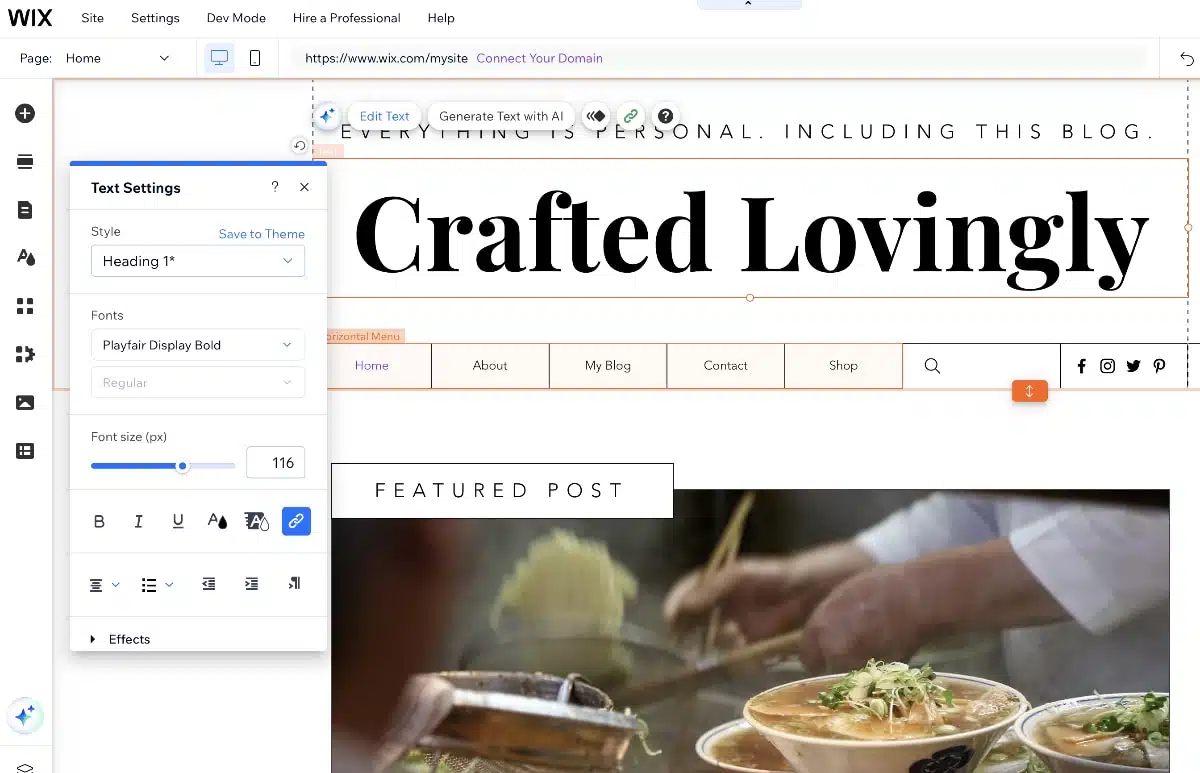
Wix’s visual editor shows the page you’re tweaking, with plenty of editing options.
All plans have the option to add more tools and integrations from a wide range of external apps as well as Wix’s own apps. This could, however, rack up the monthly cost because many of the add-ons have separate subscriptions.
“I liked the ease of building a pretty and mobile-responsive website. But if I was building a store for a real online business, I’d carefully consider if Wix was the best choice, because you can’t later copy the site over to a different ecommerce builder.”
– Emily Sorensen, Senior Editor, Mobile Transaction
The more frequently you pay for a Wix ecommerce subscription, the higher the monthly cost. You can pay up to two years in advance for the lowest cost per month, but payments are non-refundable.
Wix subscription pricing:
| Wix plan | Core | Business | Business Elite |
|---|---|---|---|
| Monthly cost* | Annual plan: A$33/mo |
Annual plan: A$49/mo |
Annual plan: A$179/mo |
*Prices include GST. Monthly plans available at a higher price per month.
Wix Payments (their own payment system) is not yet available in Australia, but there’s a good choice of online payment systems that integrate, such as Braintree and Stripe. These have their own transaction fees that Wix won’t add any charges to.
Although Wix ecommerce is very user-friendly and visually pleasing, getting help from a real customer service person is more difficult. Instead, we can see plenty of pointers in Wix so we know what to do and what the different features mean.
We should also note that Wix used to have a bad reputation for their SEO (search engine optimisation), but has improved somewhat over the years. Still, some developers don’t like working in Wix as there are still some SEO issues.
If you decide to move to a different website platform at any point, you won’t be able to export your data. This means that the online store built in Wix stays in Wix, and you’ll need to build a new site from scratch elsewhere.
Payments:
Wix does not offer its own payment system in Australia, only the external processors listed below.
- Built-in: None
- Integrations: Stripe, eWay, PayPal, Laybuy, Fat Zebra, Oceanpayment, others
- POS integration: Square
Can you try before you subscribe? No, you have to pay upfront for a plan, but there’s a 14-day money-back guarantee if you’re not happy with the subscription.
Best for: Customisations and scalability.
Pricing: US$20-$55 /mo with WordPress.com hosting
Pros: Highly customisable. SEO-friendly. Potentially no monthly fee if self-hosted.
Cons: Not the easiest to use WordPress. May need additional plugins.

WooCommerce (or Woo for short) as an option for those who need ultimate flexibility and prefer WordPress as a website platform.
Rather than being an all-in-one platform, WooCommerce is an add-on (‘plugin’) to install on your existing website built in WordPress. The great thing about Woo is that features are modular and completely customisable.
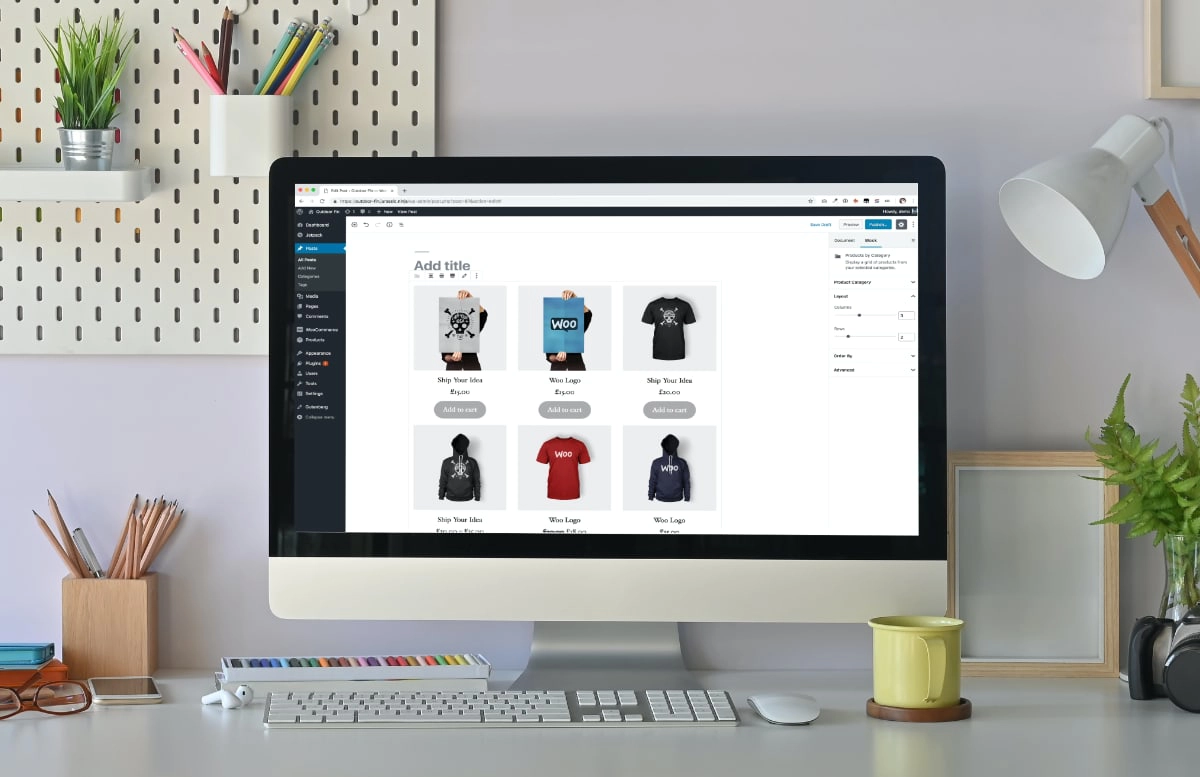
WooCommerce is a plugin in WordPress that adds ecommerce functionality to your website.
Businesses can add unlimited products, orders and users, and you can sell physical and digital products, bookings, subscriptions, content and more. Many merchants prefer to hire a WooCommerce developer to build an online store with the exact ecommerce options they had in mind.
The WooCommerce plugin itself is free, but costs are completely dependent on what you need. Domain registration, hosting and payment processing are unavoidable expenses, while website themes can be free or come at a price.
Costs of WooCommerce with WordPress.com:
| WordPress.com subscription |
Business | Commerce |
|---|---|---|
| Monthly cost* | Annual plan: US$25/mo Monthly plan: US$40/mo |
Annual plan: US$45/mo Monthly plan: US$70/mo |
| WooCommerce software | Free | |
| Card payments* | 1.75% + A$0.30 for domestic cards 3.25% + A$0.30 for international cards |
|
*Pricing excludes GST.
We recommend using WordPress.com’s own hosted subscriptions, as listed above, in which case you don’t need to find an external hosting company or pay for a premium website template.
The Commerce plan comes with WooCommerce features already built in, while the Business plan or free WordPress users have to install this and other plugins to build an acceptable online store.
Email marketing, advanced SEO tools, security, sales-enhancing features and various other extensions may require paid subscriptions.
“My experience with WordPress is that free themes are harder to tailor for a professional online store, and paying for a web designer easily costs several $1,000s upfront. That’s why a monthly fee of ~US$50 covering everything including premium themes can seem cheap. Still, you need to spend time building and managing the site.”
– Emily Sorensen, Senior Editor, Mobile Transaction
Without a WordPress.com subscription, the total cost per month can still end up being anywhere from US$20 monthly for a super-basic online store to US$1500+ monthly for a unique, high-turnover store.
Payments:
WooPayments is built into the plugin, but rates are a bit high and add GST on top. It is possible to link the online store with other payment processors, though.
- Built-in: WooPayments (Visa, Mastercard, eftpos, Amex, UnionPay, JCB, Diners Club, Discover)
- Integrations: Afterpay, Link by Stripe, others
- POS integrations: Lightspeed, Square
Can you try before you subscribe? WooCommerce is free, but you need a WordPress site to try it, which requires a subscription with WordPress.com. You can create a free site in WordPress.org, but only with an external hosting solution connected to the site – i.e. it’s more technical and still costs hosting.
Other online store platforms
We recognise the “best” ecommerce platforms are not the best for everyone. Options we didn’t include can be good for certain Australian merchants. These include:
Learn more about how to start an online business here.