
Most consumers rely on their debit or credit card to pay for things in shops in Australia. Fewer people carry cash – or even physical cards, as more people use virtual cards in mobile wallets.
Not having a working EFTPOS machine is therefore unwise for merchants, unless they are okay with losing out on sales.
But what if the internet isn’t reliable or even functional where the business is? Completing card transactions relies on the internet. Are there any workarounds without 4G, 5G or WiFi? And would it help with some other ways to accept cards online if the main card machine is down?
Thankfully, some card machines and payment software have a way of accepting cards offline. We look at your options in Australia.
How offline card payments work
First of all, “offline” card payments describe methods of reading a credit or debit card without the internet, but the information must later be submitted and verified online in some way.
You generally need online communication with card processors and banks to facilitate security checks and move the money around.
Accordingly, EFTPOS machines read the card offline, store the transaction and card information for a limited time (like 24 hours) and submit it when next online (within the time limit).
If the card was invalid, the transaction won’t go through, so the burden is on the merchant to ensure it’s valid and it is the cardholder paying.
Each merchant service provider has rules about how the cashier should verify the customer’s identity and validity of the card when there’s no internet connection. This could include:
- Checking the card expiry date
- Requesting a signature and checking it matches the one on the card
- Calling the card scheme for verification
- Writing down customer details
- Asking for a photo ID
This information might later be submitted to a bank or online.
Only cash doesn’t require an internet or telephone connection at any point, since the monetary value is physically present and given to the cashier.
EFTPOS machines accepting cards offline
Not all payment providers in Australia have EFTPOS terminals with an offline mode. We’ve done the legwork for you and found only three that currently do:
Square: offline mode without monthly EFTPOS fee
The best offline EFTPOS option for a small business that can’t commit to a monthly fee is Square. Unlike Zeller (its Australian competitor), Square has an offline mode in all of its point of sale (POS) apps and EFTPOS machines. It needs to be manually switched on before the app goes offline.
Photo: Mobile Transaction
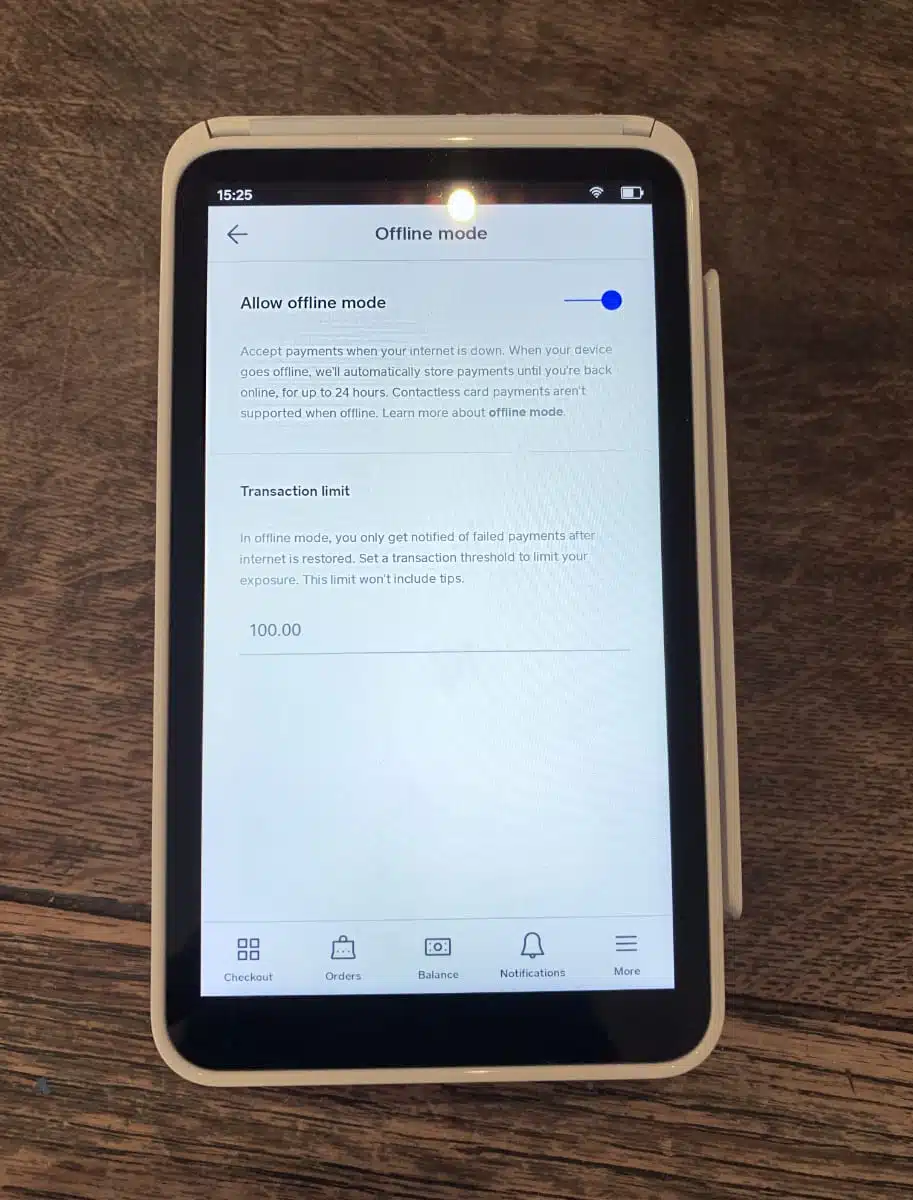
Offline mode is an optional feature you can switch on in Square’s settings (here pictured on Square Terminal).
Although the POS apps don’t work optimally if the 4G or WiFi drops, the offline mode ensures you can still accept Visa, Mastercard, American Express, JCB, eftpos cards if co-branded with Visa or Mastercard, Apple Pay and Google Pay.
It varies which Square terminals can accept chip, contactless or swipe cards offline, so you should check that first.
Square’s offline mode is also dependent on a few things: you can’t delete or log out of the app while offline, you can’t factory reset your mobile device while offline, and the app must be back online within 24 hours to automatically complete the transaction.
Square charges the same for offline as for online transactions: 1.6% for all cards.
Westpac: offline via insertion or swipe only
Westpac’s EFTPOS machines have an Electronic Fall Back (EFB) mode, allowing transactions to be processed offline and later forwarded to the banks for completion. This setting is automatically switched on if there’s a network outage.
There are limits on the maximum transaction value you can process with Westpac offline. If a credit card transaction exceeds the limit, the cashier will be prompted to call a phone number for an authorisation code. eftpos debit cards, on the other hand, can’t process amounts over the limit.
Unlike Square, Westpac can’t process cards offline via contactless, whether that’s a physical card or mobile wallet. Customers have to insert or swipe a card. This leaves out mobile wallet users entirely.
The cashier also needs to ask the customer for their signature even if a PIN is entered. This is to back up the claim that it is really the cardholder paying, not someone else.
CommBank: offline EFTPOS mode
When CommBank’s EFTPOS terminals disconnect from the internet, their offline mode (called Store & Forward) switches on automatically.
Like Westpac, it has certain transaction limits dependent on the type of card, though a customer signature is not required for all transactions. The merchant just has to follow the instructions on the terminal screen and keep the merchant copies of the receipts.
CommBank used to provide provide manual vouchers too, but they were discontinued in September 2025. These were more laborious, requiring hand-writing details about the card, transaction and your business, sometimes calling a number to verify the cardholder.
Our research found there is no offline mode on the EFTPOS machines of Tyro, Smartpay Australia, Zeller, NAB, Mint Payments or PayNuts.
Lightspeed Payments and Shopify card machines can work offline, but the feature is only available to some of its merchants (as “early access” or “beta”). Stripe Terminal supports offline mode, but requires development work to set up with your POS system.
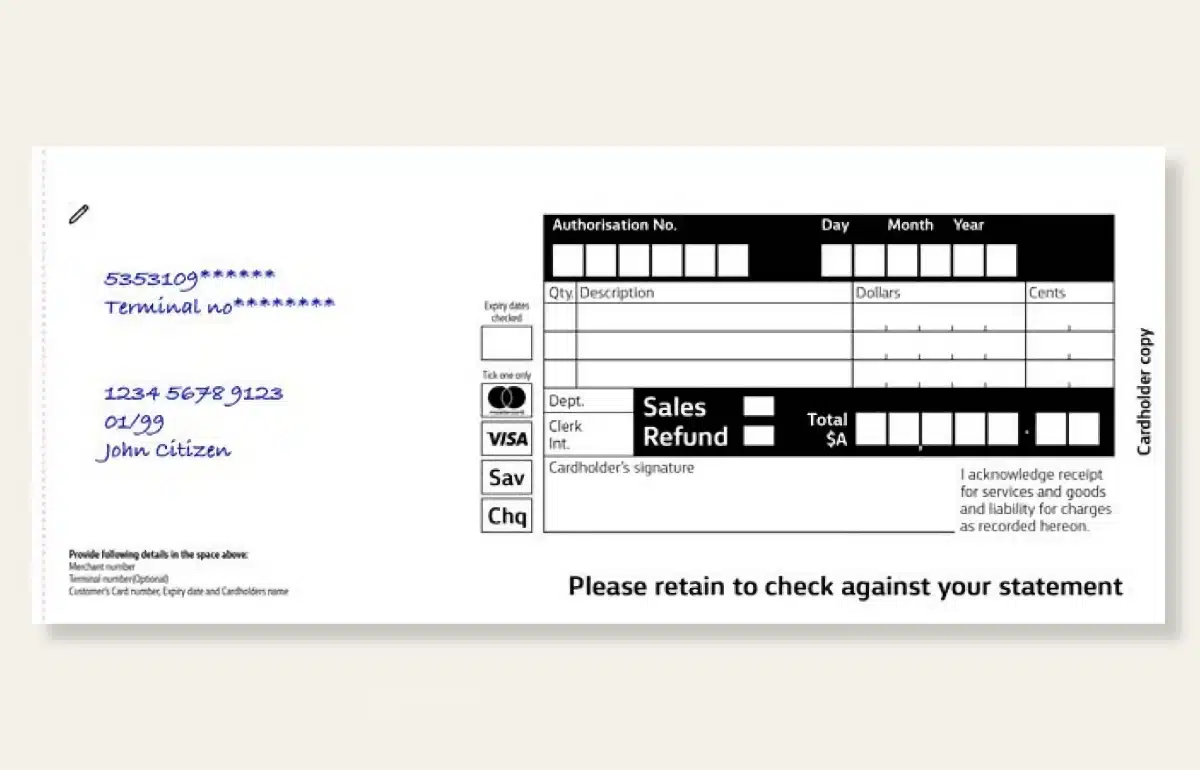
CommBank’s manual vouchers (pictured) could be used offline, but were discontinued recently.
The old fallback method: credit card imprinter
Manual credit card imprinters were common in shops until around the 1990s. They only work with embossed cards which are being phased out in Australia.
Not only are embossed cards rarer now; printed card numbers are being phased out to combat fraud, so we see more numberless cards.
Nonetheless, using a credit card imprinter is an option if you’re standing with an embossed card. The old-school device requires some manoeuvring, writing details by hand and sometimes phoning the card scheme for verification. A bit tedious all-round.
The imprinter produces a carbon copy of the card’s main details on paper slips placed in the imprinting machine. It’s the card’s embossed details that leave a copy on the carbon paper.
The merchant would then fill in additional details and ask the customer to sign. The slips are later given to the bank for processing or submitted on a computer by the merchant in a virtual terminal.
Other backup methods if the card machine fails
If your EFTPOS machine disconnects from the internet, it doesn’t always mean the alternative has to be offline payments.
Recent years have seen the rise of different methods: paying online by link, or accepting contactless taps on a phone.
Payment links
The cashier can send a link from their phone (assuming their cellular network is still online) to the customer’s phone number or email address.
The customer can then pay on the spot if they open the link on their phone and complete the transaction in the online checkout like any other ecommerce sale.
To have this backup, the business needs to be signed up with a payment provider that can send payment links from an app. Transaction fees are usually higher than for EFTPOS, since more security protocols are used when the card is not electronically read in a card machine.
Tap to Pay on a smartphone
With Tap to Pay, merchants can open an app and accept contactless cards or mobile wallets via tap and go.
Essentially, the app turns the phone into an EFTPOS machine. This is possible through the iPhone’s or Android phone’s built-in NFC (near-field communication) chip.
It requires being signed up with an EFTPOS provider that offers Tap to Pay, for example Square, Zeller or Tyro.
Agreeing on another way with the customer
If you can’t take the card payment upfront, you have a few last resorts that could hopefully save the sale.
You can obviously ask if they have enough dollars to pay in cash. People may likely have small amounts, but large amounts? Probably not. In that case, ask the customer to take out cash from an ATM and come back.
Alternatively, get them to write down their phone number so you can call them if they’re willing to come back when the EFTPOS machine is up and running again.
If they can’t come back, you can take their card details over the phone and complete the transaction via keyed entry on the card machine or in a virtual terminal on a computer.