
Whether you accept payments online, through EFTPOS machines or over the phone, integrating a payment system with accounting saves you time. The alternative is to manually feed sales data into a bookkeeping system.
Perhaps you already email invoices that just ask for bank transfers, realising card payments would make clients pay faster (a known fact). Card processing payouts also tend to be faster, ultimately improving cash flow.
For many, all this means choosing a payment system that works with Xero, the leading accounting system in Australia.
We’ve tried and researched the best payment systems that link with Xero to automate accounting. Some of them specialise in in-person payment products, others in online, but most of them cater to both.
Compare payment systems integrating with Xero in Australia:
| Payment system |
Xero integration features | Best for | Transaction fees* |
|---|---|---|---|
|
Square |
|
Retail, cafés, trades with POS + online needs | 1.6% (EFTPOS), 2.2% (online) |
| Stripe Visit |
|
Online stores, SaaS, global selling | 1.7%-3.5% + $0.10/$0.30 |
| Zeller Visit |
|
SMEs in retail or hospitality | 1.4%–2.9% + $0.25/$0.30 |
| Airwallex Visit |
|
Global multi-currency business, remote teams | 1.65%-3.4% + $0.30 |
| GoCardless Visit |
|
Subscription businesses with clients anywhere | 1%-2.25% + $0.40 |
| Tyro Visit |
|
Retail, hospitality, healthcare needing Medicare integration | From 1.4% |
| PayPal Visit |
|
Freelancers, ecommerce, global sellers | From 2.9% + $0.30 |
*Australian dollars inclusive of GST.
Square – instant funds and detailed feeds
Best for: Small retail, hospitality and service businesses selling both online and in person.
Why Square is good with Xero:
- Instant card payment payouts via Xero invoices, in addition to bank transfers.
- Integration supports multiple locations.
- Daily, detailed import of sales down to transaction level.
- Many online payment methods synced together.
Although the Square-Xero integration is promoted as direct, it is Amaka who’s built and is providing support for it.
In Xero, you’ll receive a daily summary of the previous day’s sales in Square. The integration allows users to set up rules about how detailed the breakdown of sales should be, down to a breakdown of individual transactions, fees, tips and taxes.
Invoices sent from Xero can be paid via Square’s online payment system, so you benefit from using the same payment system for invoices and POS sales. What’s more, Square offers instant transfers of funds for an extra fee of 1.5%.
Square sales from multiple locations can also be synced with Xero (to one or several Xero account files).
On a general note, we love Square for its highly adaptable payment tools without commitment. You only pay for transactions (1.6% for EFTPOS, 2.2% for online or keyed), with a monthly fee only for certain advanced features.

Stripe – direct integration with useful payment options
Best for: Online businesses with a developer on hand to tailor payment flows.
Why Stripe is good with Xero:
- Direct integration with Xero not built by third party.
- Real-time payout syncs in Xero.
- Recurring card payments great for subscription models.
- Choice of currencies, cards and mobile wallets for transactions.
The Stripe-Xero integration syncs payouts in real time in Xero, but many are complaining about slow payouts, which is less about the integration. Users generally wait 5-8 business days to receive the first batch of payments in their Australian bank account, then 2-5 business days.
On the plus side, Stripe accepts many different currencies. Xero also matches your bank payments with Stripe (both payments and fees) when an invoice is paid, though you still need to confirm the match manually.
Businesses offering subscription plans can set up recurring payments from a card, initiated by the customer on a Xero invoice.
In addition, you can accept different cards types, Apple Pay and Google Pay through Xero’s invoices.
Stripe is generally a very scalable payment system for online businesses. It lets companies custom-build subscription systems with recurring payments, tailor their ecommerce checkout and set up payment rules for nearly any type of business model. It does, however, require developers to set up the code.
Zeller – real-time feeds of Zeller Transaction Account
Best for: Small retail and hospitality businesses that mainly accept payments in person.
Why Zeller is good with Xero:
- Real-time bank feeds of Zeller Transaction Account in Xero.
- Competitive rates for online payments through Xero invoices.
- Nightly payouts in Zeller Account linked with a debit card.
Zeller is a popular, Australian payment company that sells EFTPOS machines for small businesses.
Where other payment systems tend to submit transactions once a day to Xero, Zeller updates transactions immediately in Xero if you choose to receive them in the online Zeller Transaction Account.
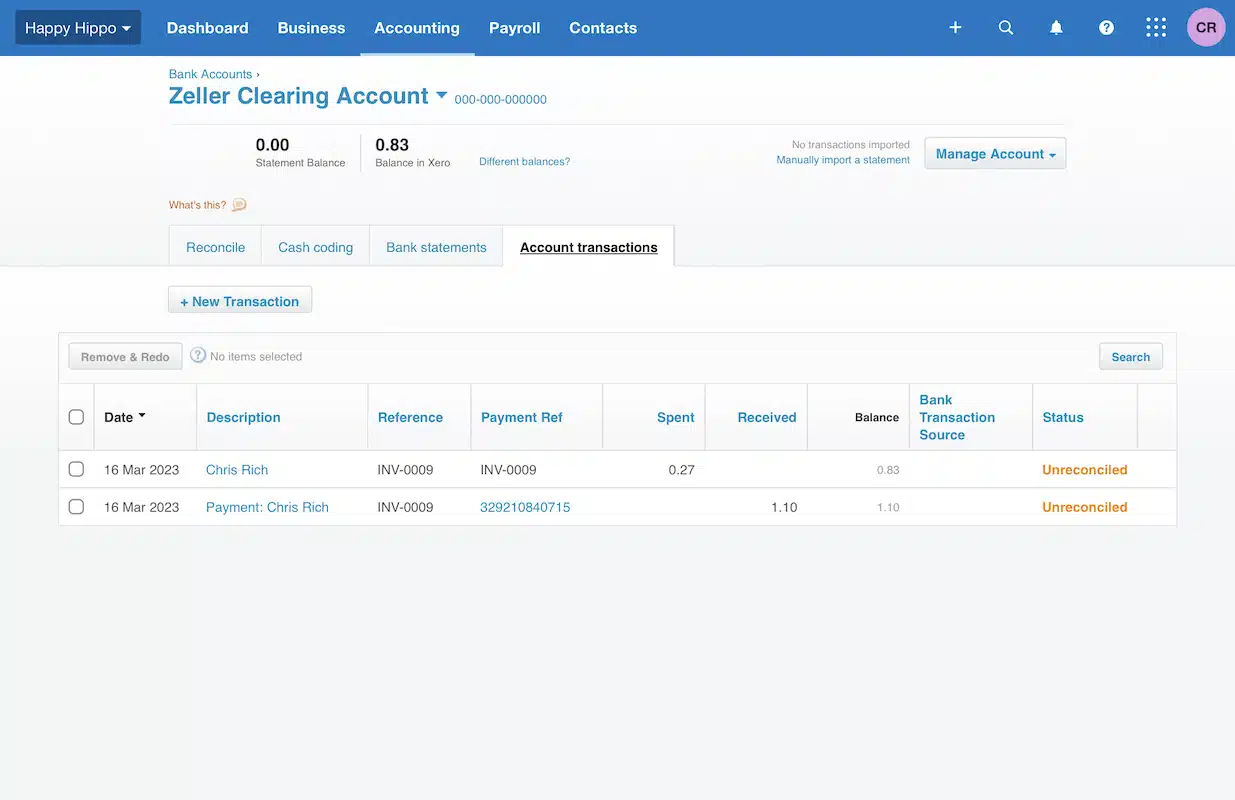
A Zeller clearing account is created automatically when you connect Zeller to Xero invoices.
Zeller merchants get a free Transaction Account linked with a Mastercard, where transactions go the next morning 7 days a week to spend immediately with the card (if needed). Merchants can also receive payouts the next business day in their bank account, but then doesn’t benefit from real-time bank feeds in Xero.
With the Zeller-Xero (or shall we say… Xeller?) integration, your clients can also pay Xero invoices with a card through Zeller’s payment system. This costs 1.7% + $0.30 incl. GST for domestic cards and 2.9% + $0.30 incl. GST for any foreign card – the latter cheaper than Stripe.
Airwallex – multi-currency, customisable Xero flows
Best for: Companies receiving and sending money across borders in different currencies.
Why Airwallex is good with Xero:
- Hourly syncs of bank feeds in Xero, not just daily.
- Bank feeds for individual currencies in Xero.
- Can set up automated rules for transfers, receipt issuing and much more.
- Good rates and transfer speeds for international payments.
We’re fans of Airwallex and use it to pay freelancers in different countries at no cost, thanks to its many local transfer options. Not only can companies create local accounts in different currencies to avoid currency conversion fees – rates for payments are low and transfers fast.
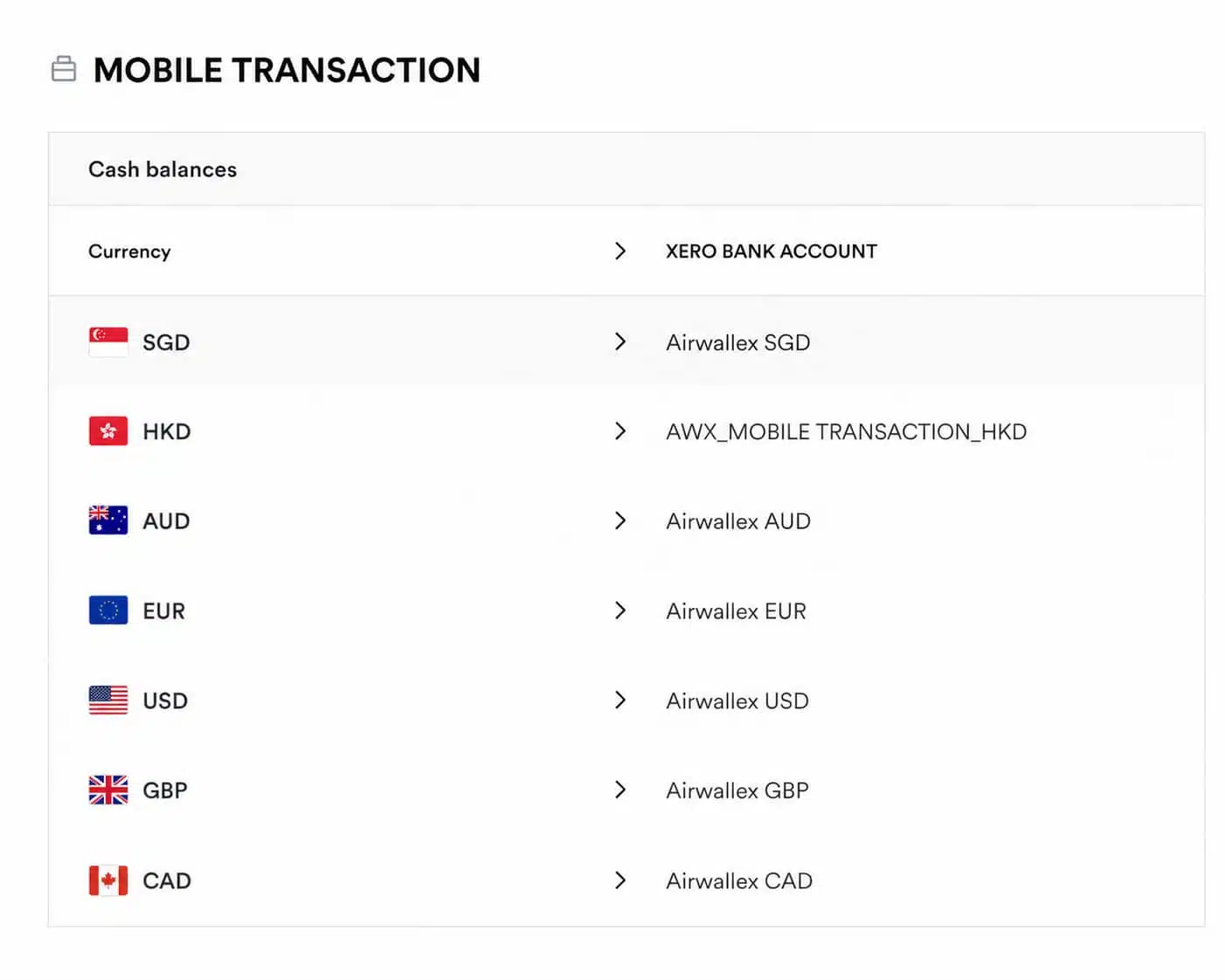
In Airwallex, you will find simple settings for mapping individual currency accounts with those set up in Xero.
The Airwallex-Xero integration is similarly good, as it automatically updates transactions every hour in Xero as opposed to once day. But the real advantage are the custom rules you can set in Xero, like automatically transferring money between currencies and paying vendors.
If you’re handling payments in different currencies, Airwallex and Xero together can therefore save you a ton of time by automating transactions, not just accounting records.

GoCardless – better bank transfers via invoices
Best for: Businesses that receive payments mainly via bank transfers or subscriptions.
Why GoCardless is good with Xero:
- Recurring and one-off bank payments are made easy but dependable through Xero invoices.
- Low transaction fees (from 1% that’s capped at $4).
- Can receive bank payments from foreign accounts, not just Australian banks.
The GoCardless-Xero integration links bank payments to Xero invoices, so this is a solution for businesses that routinely invoice customers. When the recipient receives your Xero invoice via email, they can click a pay button and easily confirm their bank details to pay by direct debit (recurring) or bank debit (one-off).
GoCardless does not accept card payments, only bank transfers. Although consumers love using cards, bank payments are still preferred for ongoing billing, which subscription-based businesses should take note of.
GoCardless is good at automating payments so merchants don’t have to chase unpaid invoices, and settled invoices are automatically recorded in Xero.
We love the fact that merchants can receive bank debits from non-Australian bank accounts too. The fees are higher for international transfers (2%-2.25% + $0.40), but still lower than card processing rates. Domestic transfers only cost 1%-1.25% + $0.40 (capped at $4-$5) depending on the plan.
It usually takes 2-3 business days for domestic BECS transfers to reach your bank account or 4-7 business days for cross-border transfers.
Tyro – integration only with Tyro Transaction account
Best for: Hospitality and retail businesses that need EFTPOS with its own account and fast payouts.
Why Tyro is good with Xero:
- Merchants get a free Tyro Transaction Account that connects with Xero.
- It’s easy to connect the account with Xero through an app.
- Payable invoices and pay runs in Xero are sent to Tyro App for real-time approval.
Tyro integrates with Xero, but only if you use the Tyro Transaction Account for receiving EFTPOS payouts instead of a business bank account. This is not bad if you need a business account that’s managed in an app, especially as EFTPOS funds settle the same midnight, 7 days a week.
The Tyro-Xero integration automatically updates transactions once a day, not several times, in Xero.
On the other hand, merchants can approve payments of Xero invoices and pay runs directly in Tyro App in real time without having to log into Xero.
Tyro is best known among retailers and restaurants who can commit to monthly terminal rental. Among key benefits, merchants get Australian support (since it’s an Australian company), but there have been issues in the past around EFTPOS outages.
PayPal – for a branded Pay button on invoices
Best for: Online tradies and companies whose customers prefer paying with PayPal.
Why PayPal is good with Xero:
- Allows you to accept PayPal transactions via Xero invoices.
- Supports many currencies, making it ideal for international client billing.
- Integration allows you to automate transfers from PayPal to a bank account.
With a PayPal-Xero integration, businesses can add a PayPal button on Xero invoices so clients can pay this way.
This is great for customers who already use and trust PayPal, but expensive for merchants who are charged high fees with PayPal (from 2.9% + $0.30 for domestic, from 3.9% + $0.30 for international transactions).
One of the biggest benefits of the integration is the ability to automate deposits from the online PayPal Business account to a linked bank account. Normally, merchants have to manually “withdraw” money received instantly in the PayPal account into their linked bank account.
PayPal transactions are only updated once a day in Xero, though.
In Australia, PayPal is for online businesses only. The platform offers a range of payment links, remote transactions and ecommerce integrations, but no card reader for brick-and-mortar stores.