


Recent years have seen the rise of Tap to Pay on iPhone or Android – the ability to accept contactless payments on just your smartphone.
No separate card reader is needed, just your mobile device and a payment app with the function.
In the app, you create a transaction and accept the tap of a card or digital wallet on the back of the phone to finalise the payment.
Other names for the technology are Tap on Phone, Tap to Phone or softPOS in tech speak, but Tap to Pay is now the popular name, as you’ll notice from providers.
Let’s take a look at how merchants in Ireland can start using it.
Photo: Mobile Transaction
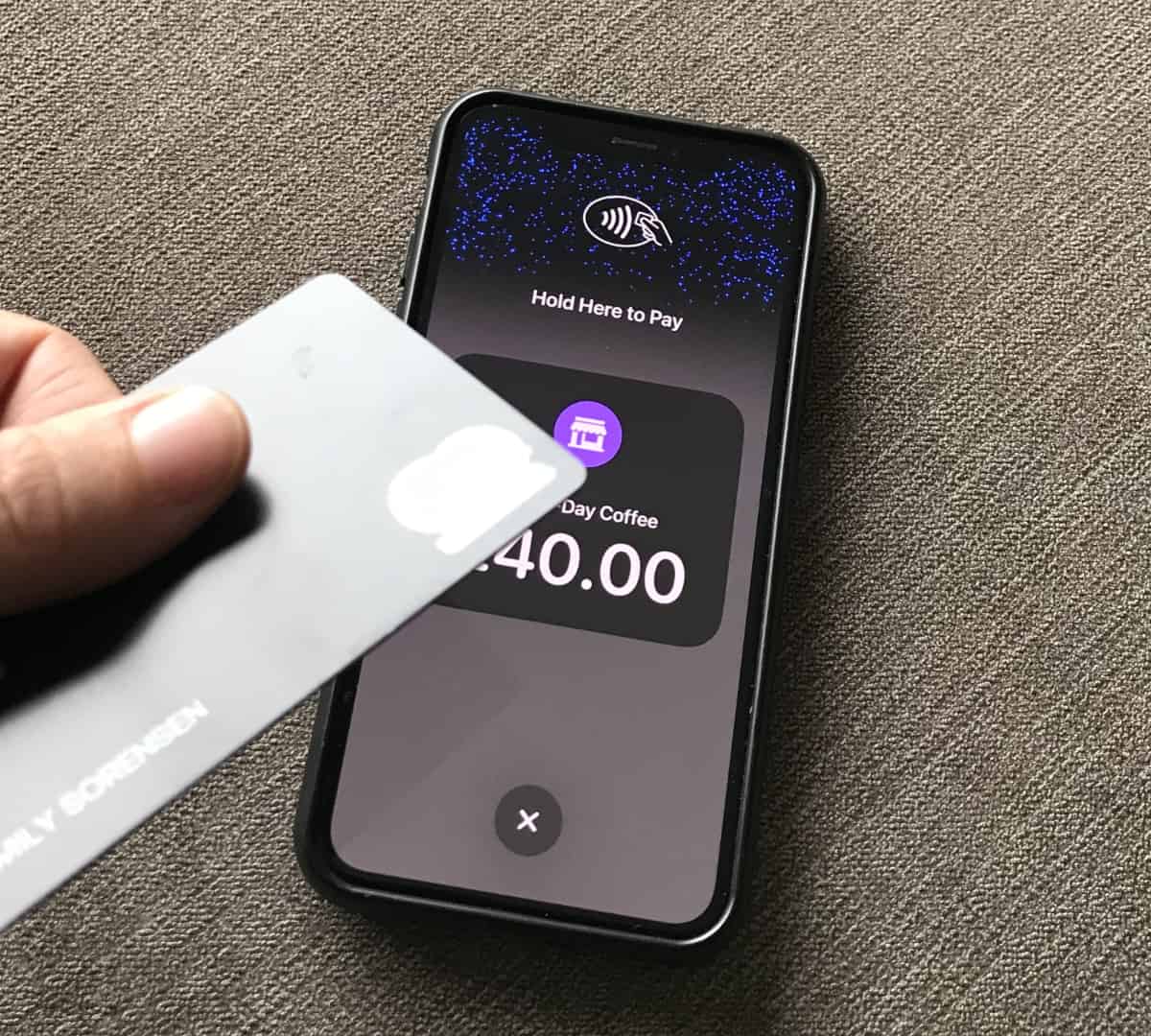
The Tap to Pay screen on iPhone looks like the one pictured no matter which app you choose.
| Solution | Android | iPhone | Best for | Costs |
|---|---|---|---|---|
| Square (offer) | Yes | Yes | Feature-rich checkout app and fast sign-up | 1.75% + VAT /transaction, no monthly fee or contract |
| Revolut (offer) | No | Yes | Business banking for freelancers and companies | 1.7% (Pro) or 0.8%-2.6% + €0.10 (Business) /transaction, from €0 /month, no contract |
| SumUp | Yes | Yes | User-friendliness and simple interface | 1.69% /transaction, no monthly fee or contract |
| myPOS | Yes | No | Flexibility to use Tap to Pay abroad | 1.69%-2.19% + €0.05 /transaction, €0-4.99 monthly fee, no contract |
| Mollie | Yes | Yes | Online payments features | 1.2%-2.9% /transaction, no monthly fee or contract |
| Stripe | SDK* only | SDK* only | Complex customisability options | 1.4%-2.9% + €0.20 /transaction, no monthly fee or contract |
| Adyen | No | SDK* only | High-turnover companies | Variable rates, custom pricing |
* Software development kit (SDK) for integrating softPOS in your own payment app.
So far, Square, SumUp and Mollie are the only payment service providers offering Tap to Pay out-of-the-box on both Android and iPhone. Android users can also choose myPOS whereas iPhone diehards can go for Revolut.
Which is best?
The Tap to Pay payment screen actually looks the same in all iPhone apps regardless of the payment provider. Apple seems to have hard-coded the design of this.
Android’s screen, on the other hand, have different looks across the payment solutions.
Regardless of the app, once you’ve activated the payment screen, they all swiftly process the contactless payment.
What you should be looking for is which payment processor suits your budget, preference for features and how it fits in with your business.
If you’re only dipping into this to test it, we recommend picking a platform that’s very quick to sign up for – which would be Square or SumUp. The most scalable of them is Square with its many complimentary features like specialised POS systems and choice of online selling tools.

Revolut Business is slightly more tedious to sign up for and stay with, as they require reconfirmation of details periodically. But if you’re a Revolut Pro customer, it will be easy to request access and start taking contactless payments on an iPhone.
Crossborder sellers benefit from myPOS, since it takes payments across the EEA and UK. That said, the sign-up requires several steps, such as a video call.
We’d only consider Stripe if we had a developer to custom-code the feature into our own app (which we don’t have). Adyen’s tap-on-phone is similarly customisable, but only suitable for high-volume businesses.
Summary of solutions
Square
Tap to Pay can be switched on in the Square Point of Sale app, which also connects with Square Reader. The app also allows you to send payment links and accept QR code payments. Tap transactions via Square cost a fixed 1.75% + VAT with no monthly fees or commitment required.
“The most updated, flawless and user-friendly app with Tap to Pay is Square’s, in my experience. Revolut’s app is somewhat less intuitive, as it’s for business banking mainly, with payment acceptance taking a few more taps to reach than Square’s user flow.”
– Emily Sorensen, Senior Editor, Mobile Transaction
Revolut
Both the Revolut Pro account for freelancers and Business account for companies accept tap payments. There’s no monthly fee with Pro, just a fixed 1.7%, which is lower than Square’s. Companies do, however, pay a monthly fee from €10 for the account and 0.8% + €0.10 for domestic consumers cards or 2.6% + €0.10 for other cards.
SumUp
SumUp charges an even simpler rate for its Tap to Pay on Android: 1.69% for any card. Like Square, SumUp’s app has several online payment options making it easy to accept payments in most contexts.
myPOS
myPOS, in contrast, charges a few different fees for its myPOS Glass app, where Android users can accept tap-to-phone. A higher rate, 2.19% + €0.05, applies for EEA card transactions with a monthly subscription. If you pay €4.99 + VAT per month, this fee is lowered to 1.69% + €0.05 per contactless EEA card transaction.
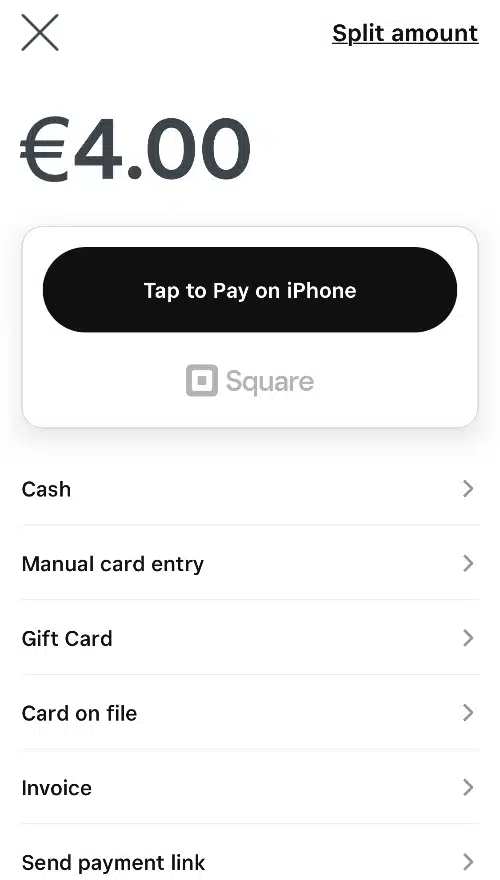
Tap to Pay is a prominent payment option in the Square POS app.
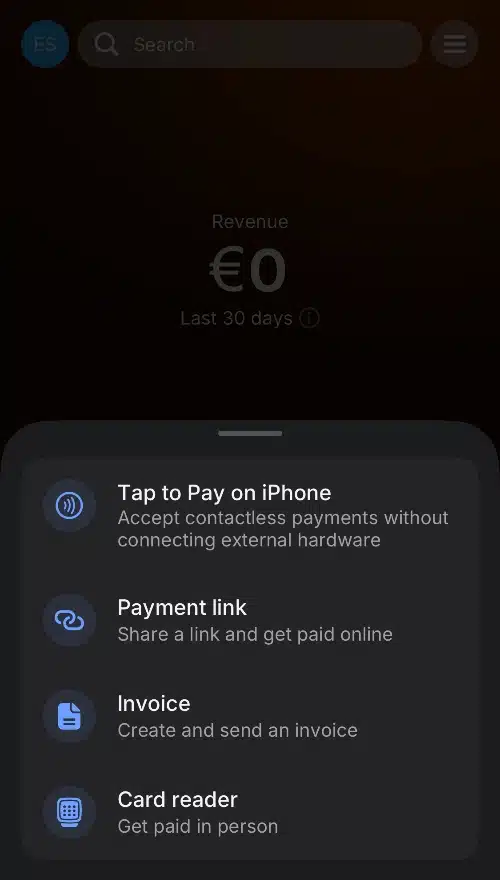
The Revolut Business app accepts Tap to Pay on iPhone.
Mollie
Dutch online payments platform Mollie offers Tap to Pay on iPhone and Android to businesses in Ireland. On their Pay As You Go plan, Irish consumer card transactions cost 1.2%, whereas commercial cards are charged at 2.9%. The €20/month Pro plan charges 0.85% + €0.10 for domestic consumer cards on an annual contract, with American Express and commercial cards reaching 2.50% + €0.10.
Stripe
Stripe Terminal offers its own Tap to Pay on Android or iPhone option, but only for companies with the resources to implement codes in a custom app. In other words, small businesses aren’t really able to use this out of the box.
Adyen
Adyen is similar to Stripe with its customisation options for iPhone Tap to Pay (not Android), but is even more geared towards large companies with a high sales turnover.
How tap-on-phone works
To accept contactless payments without a card machine, you need a mobile device with near-field communication (NFC). Practically all newer smartphones have this.
Essentially, the smartphone – like card readers – transmits card transaction data to the payment processor exchanging the information between banks, card issuers and other mediators. When authorised by all parties, the transaction is confirmed as successful on the smartphone screen.
But first of all, you have to subscribe to a merchant service offering Tap to Pay on iPhone or Android (depending on your device’s operating system).
The service will tell you to download a specific app on your phone and log in with your merchant credentials while connected to the internet. This is enough for a smartphone (or compatible tablet) to receive contactless payments.
To accept a Tap to Pay payment, you enter the transaction amount in the app and touch the confirmation button. The customer can then hold their mobile phone or contactless card close to your smartphone, which will read and process the payment via the internet.
The merchant service provider transfers the funds to your business account, typically within 1-3 business days, just like any card reader service.
Advantages
Disadvantages
A couple of the disadvantages relate to customers having to touch and hold the phone.
Sometimes, a softPOS app might ask for a PIN code, mainly when the transaction amount exceeds the contactless limit. The merchant is then forced to give the customer the smartphone so they can enter the code on the touchscreen.
This is not the most hygienic solution, and customers may also be reluctant to enter their card PIN on a stranger’s phone if they’re concerned about security.
Some merchants may think about purchasing a phone to dedicate exclusively for this purpose, but then why not buy a card reader that’s cheaper and less likely to be stolen?
In addition, tap-to-phone only processes contactless payments, not chip cards that have to be inserted. If a chip card doesn’t have a contactless function enabled, your Tap to Pay app will be of no use.
So when can it be a good solution?
Tap to Pay could be considered a secondary card reader for emergency situations (e.g. during technical issues with a card terminal or WiFi) or to accept payments from customers who can’t pay in cash (if you try to be cash-only).
Card reading capabilities in a smartphone is also useful for home deliveries and shops, bars and restaurants with large serving areas. The portability of mobile phones is, in fact, the main advantage of Tap to Pay.